Wednesday, April 1, 2015

#27 The process for the Tinder-Browsing gif and other boring stuff

There's not much to say about the last gif I made that I haven't already gone over before, but there's still some stuff I want to talk about:

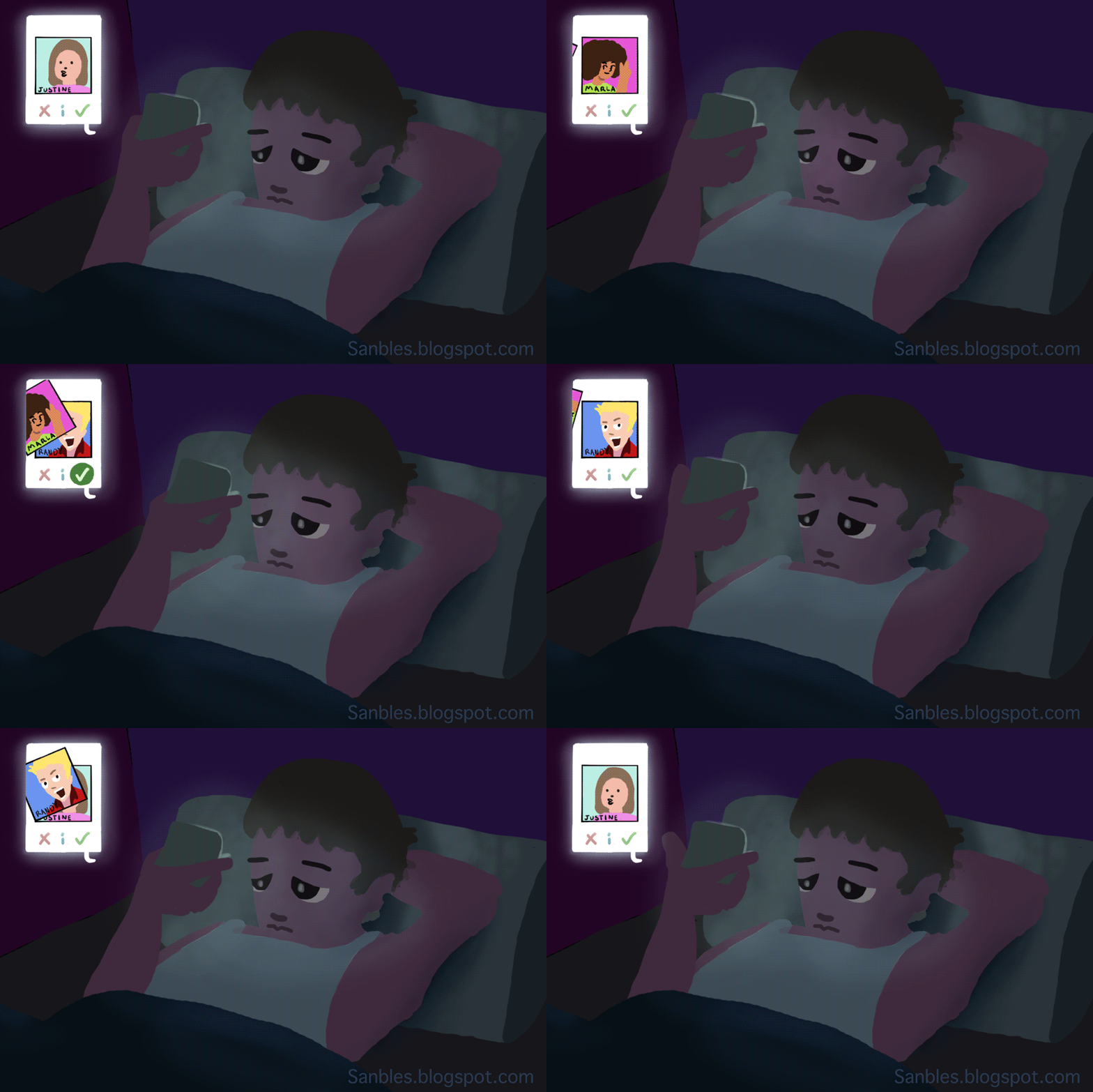
I used really dark colors when I blocked in all of the colors, so when I added the lighting animation, it would highlight the face and create a strong contrast between that and the background. That's why my preview post looked all bad, because I hadn't added the glow coming from the phone.

To make that phone screen animation (mainly the pictures sliding out of the screen. The 'like' button animation is pretty simple to make, I think anyone could figure it out.), I duplicated the picture several times, and then I moved it a bit each time. There was no mask holding the picture in that screen, so it was just flying out of the screen like this:


I had to go over all of the frames and erase the parts that weren't inside the screen.


For the animated lighting, I duplicated the layer that had just the guy, and used that checkered button I talked about in this post to make sure only the guy was affected when I added the light. I used some sweet textured brush with low opacity to make the lighting.

That's about it, I think.
__________________________________________________________

UPDATES AND NEW GIFIC PLAN.

Small little gifs are exhausting me. I feel like I'm starting to outgrow them, wanting to move more into making stuff like my Delta comic. I want to make a comic that allows me the freedom to change styles in the middle of it. The purpose of this blog is for me to keep learning from other places, so that's why, but it's also fun finding new artists and see what their workflow is like. I'll probably make one more, small, loopy thing, but then that'll be it.

Again, my time ran out for this week. I'll be more productive next time.

Probably. Not.

Thursday, March 26, 2015

#26 Tinder Browsing

This took so long...


You like? Again, I tried experimenting with animating light. I don't like having to post it as a gif, because I have to compress the file a lot, and the colors don't look as cool as on Photoshop. And speaking of Photoshop, look at all the layers I had to use for this gif:


I might talk about how I made this on the next post, because I'm out of time for this week.

Peace.

EDIT: By the way, I don't do this. It just came to me while thinking about a way to animate light. Seriously. I don't... Eh whatever, you won't believe me.

Friday, March 13, 2015

#25 Sneak Peak


I haven't finished my latest gif, so I'll just post a picture of where I'm at right now. I'll explain the process I went through next time. It'll be a while before I post again, because next week is Spring Break!


See you soon.

Monday, March 9, 2015

#24 How to Animate using masks

I'm coining a new term, ninja animation. It's the type of process where masks are used to animate....

Get it?...

I thought I'd show how I do it here since that's sort of what this blog is for. It's also not that complicated.
________________________________________________________

TUTORIAL

Step 1: Make your drawing with the usual tool you use to draw. For me, it's the default brush tool.


 Step 2: Make a new layer above it and then use the lasso tool to mask around the drawing.


Step 3: Fill in the mask with any base color. I choose to use a skin color, so later I only have to color in the clothes' color.


Step 4: Move the layer with the original sketch above the one with the base color. We do this to see where everything is supposed to go.


Step 5: This is the cool part. I like this option that Photoshop has. Select the layer with the base color, then click on the checkered symbol next to where it says "lock". This means that if you try to draw on that layer, you'll only be able to draw where color has already been placed.


Step 6: Color your object appropriately.


Step 7: I just chose to add some detail here. You don't have to do this.


And Ba-da-bing. There it is, a neat way to color in shapes without needing lines. And remember that if you're going to animate like this, call the process you used 'ninja animating'. I'll feel special if you do.

Saturday, March 7, 2015

#23 Needing ideas

So about this gific, Delta... Instead of taking five weeks to do it, I finished in three days. That's something, huh? I don't know how I overestimated the time I would take to do it by that much. I'm pretty proud of myself. Now, I think, is a pretty good time to self-reflect on how it turned out:

Looking back, I think I rushed on it. No, actually, I did rush. Part of the reason why I finished it so early was so that I could present it for this other school project. The deadline for that happened to be on the day I posted the gific. I wasn't planning on completing it that early, but once I noticed it was possible to submit it for the other project, I set out to finish in that week. So that happened.

In terms of technical stuff, I think the animation could've been better. I was animating from 12 fps to 2 fps. I don't think two frames per second can even be considered animation.  That's more like slideshow frame time. Furthermore, all of the strips aren't completely clean. Colors and lines sometime go outside their panel on accident. I also wish I had animated the words, but that would've brought a lot more work. As a whole, more detail would've been better. Specially with shadows. I wanted to put more of them.

Beggars can't be choosers though. I decided to give up some quality so I could finish on time. And I guess that's that.

Onto my next project!
___________________________________________________________

I wasn't aware I would be able to make more stuff once I finished Delta. Now there's like four weeks left for me to start on the next season on learning PS, and I have no idea what to do with it.

But now that I think about it (it's been two days since I wrote the stuff above) I think I want to focus on making an animation paying attention to light. This idea has been on my mind since I saw a short movie called The Dam Keeper. They did something special with animation and that is that they didn't just animate lines, they animated form. That film is the only one I can find right now that does this so... elegantly. It's enough to go off of, I think.

Something like this...

 12fps

I think this even incorporates more of what Photoshop has to offer, so that's pretty cool. I'll try to make something with more pizazz next time.

Sunday, February 22, 2015

#21 Moving Comics: A New Era for Animation


Sorry if this post drags on. I want to post all of my planning here, so I never have to focus on it again. I hate planning.
______________________________________________________

Last year, I found a new style of animation. It's a combination of comics and animation conveyed through the use of gifs. I don't think a name's been coined for this style, since it took me a while
to find examples. All of the websites referred to their style with a different name. I'm just going to call them 'Gific's until people have found a name for them. Here are examples:

Thunderpaw by Jen

Animated Comics - Extract 1 by Stephen Vuillemin

Untitled by Tom Law 

Bottom of the Ninth by Ryan Woodward

I want to do something like this. Coincidentally, I've had this story idea I've wanted to do. It's about a group of personified emotions who have fallen into a loop where nothing special or exciting happens in their lives. They then fall apart and forget who they are. It's going to be a lot of talking, so it'll be a challenge for me to make it interesting. I think I'll just make three characters, Angry, Happy, and Sad.

Anger: He feels like there's no way he can change, like he was born into his situation. 

Happy: He feels like nobody cares about him until they need him.

Sad: He feels like he's the normal one and the whole world is crazy. If everyone changed the way they thought to be more like him, all the problems in the world would go away.


I'm going with #6 for the designs. I don't think I do this 
to choose from the list later.  I just do this to evolve my
ideas as I keep doing more and more designs.

I'm going to make a three panel strip. The story will be told like those spiderman comics in the newspapers. If you want to look at the whole story, you have to put all the strips together. That way, when I show my progress here, it'll be in the form of one complete strip. In total, I want to make 5 strips that tell the complete story.

Plus, I want the relationship between the emotions to be a rock, paper, scissors type of relationship. If Sad is feeling angry, It'll only make him feel frustrated. If he's feeling happy, he'll feel peaceful. Anger will feel frustration from feeling happy, peaceful from sadness. Happy will feel frustration from feeling sadness, peaceful from anger.

So once everyone starts getting comfortable with the emotions they're having, they learn that they were one complete being, but got separated when they became selfish and made the whole story about themselves.

 These designs are for the merged being.
I'm going with the last one.

The setting will be different for each character. 

Sad will be in a ditch that is just big enough to not be able to climb out of. He has become content with his hole. In there, he only has to deal with himself and not hear about other's problems. 

Happy will be walking alone in an open field that goes on for miles in every direction. He wants respect, so to show people that he's not a slave to them, he's going as far from civilization as possible. People will have to work to get to him. He yells in anger every once in a while to deal with his frustration. Nobody can hear him anyway.

Anger will be mining in a cave. He always cries when he's mining, because he finds it makes it easier for him to keep doing him job.


The Draft:

If you don't want to be spoiled of the story, don't read through these.


This is my very sloppy planning. I just wanted to flesh out the story. It probably doesn't make any sense, but it will once I finish the whole series. It also ended up being ten strips. Not five. I think I can make it work though. I'll just have to make two strips each week. And knowing where everything's going to go will make everything super easy and fast to do.

Well that's it then. On my next post, I'll post my first two strips. So excited!